ChromaSpot
ChromaSpot is a universal color library available to the industry to use and apply to typical tasks without any fees. Built using spectral data, the library provides industrial infrastructure that provides ink manufacturers and pigment creators the ability to communicate color references on the highest industrial level throughout the manufacturing chain.
CxF data exchange provides color definitions for manufacturing systems and exports to Adobe Color Swatch file formats making samples easily accessible to creatives and production professionals.
The professional color library where color is not substrate-related.
 |
= | 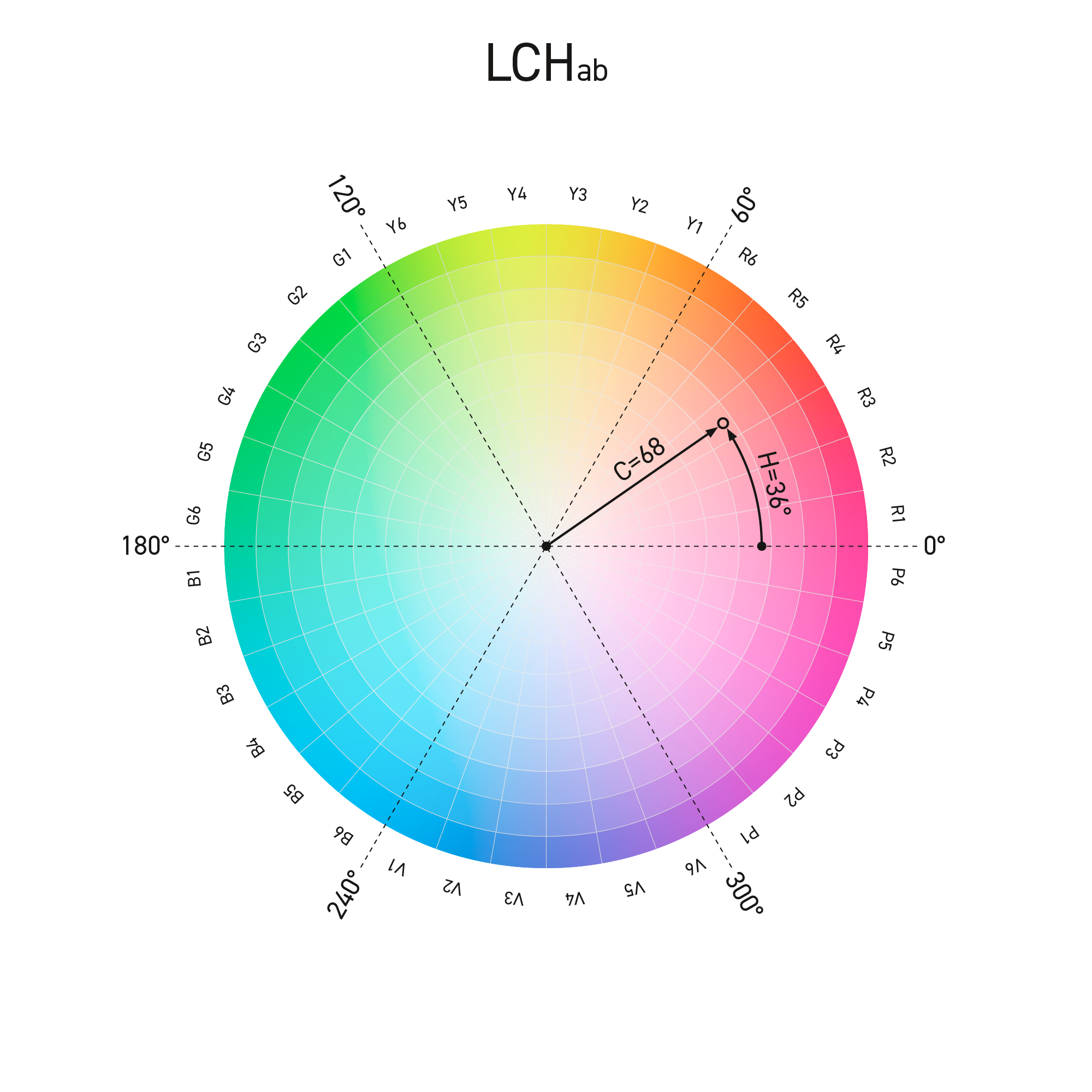 |
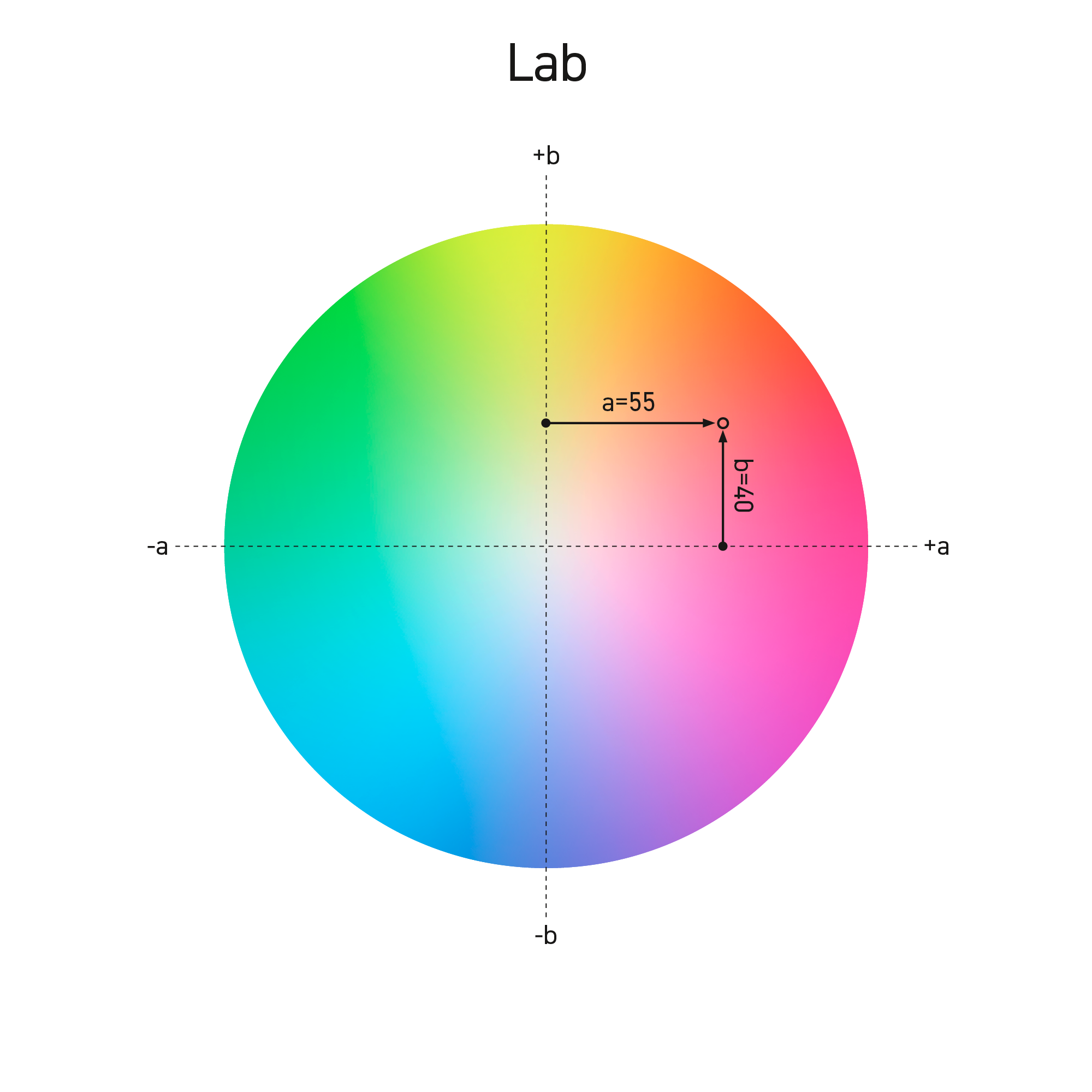
| CIE Lab color space is commonly used by most industry standards, color management, and quality control solutions. | CIE LCH describes the same space using polar coordinates (radius and angle) — which is much more intuitive for humans. |
ChromaSpot simplified LCHab notation to code samples — This is the simplest system ever!
CH.L
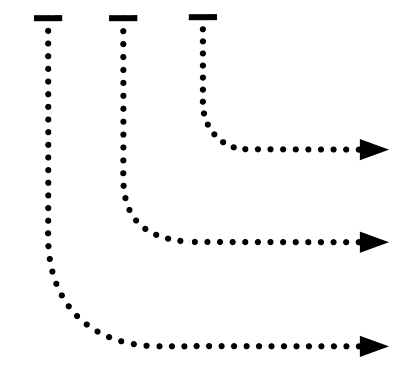 |
L → Lightness — integer of the L (Lab or LCHab) H → Hue bin — one of 36 10°-wide segments of the color wheel. C → Chroma N, 0-9 (tens of the C value) |
LCHab → CH.L
The following diagram helps understand colorimetrical coordinates conversion (one-way) to ChromaSpot code.
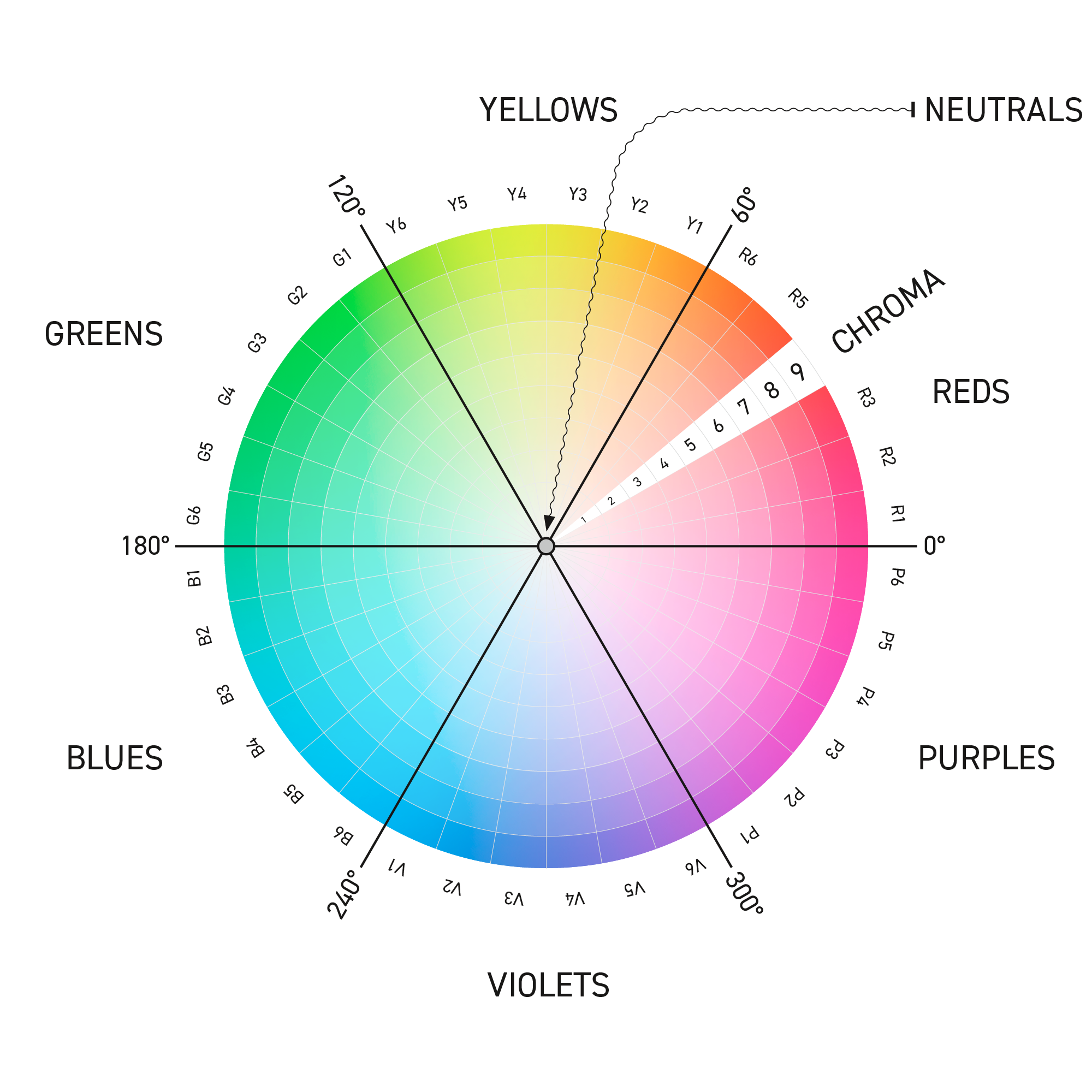
Chroma (C) — the first parameter
determines sample saturation that translates Chroma value based on the simple remember principle.
| Chroma | 0 - 0.5 | 0.5 - 10 | 10 - 20 | 20 - 30 | 30 - 40 | 40 - 50 | 50 - 60 | 60 - 70 | 70 - 80 | 80 - 90 | > 90 |
| code | N | 0 | 1 | 2 | 3 | 4 | 5 | 6 | 7 | 8 | 9 |
| saturation | neutrals | pale | moderate | high | extreme | ||||||
Neutrals (shades that seem very neutral) and Grays that can have visible color shade are "isolated" from all other samples where one digit almost directly corresponds to the Chroma's decimals.
Hue angle (H°) — the second parameter
is a range of hue angle values where the color wheel is split into six sectors with three subsectors each. Such a rule makes a single subsector 10° wide.
| Hue | 0° | 10° | 20° | 30° | 40° | 50° | 60° | 70° | 80° | 90° | 100° | 110° | 120° | 130° | 140° | 150° | 160° | 170° | 180° | 190° | 200° | 210° | 220° | 230° | 240° | 250° | 260° | 270° | 280° | 290° | 300° | 310° | 320° | 330° | 340° | 350° | 0° |
| code | R1 | R2 | R3 | R4 | R5 | R6 | Y1 | Y2 | Y3 | Y4 | Y5 | Y6 | G1 | G2 | G3 | G4 | G5 | G6 | B1 | B2 | B3 | B4 | B5 | B6 | V1 | V2 | V3 | V4 | V5 | V6 | P1 | P2 | P3 | P4 | P5 | P6 | |
| REDS | YELLOWS | GREENS | BLUES | VIOLETS | PURPLES | ||||||||||||||||||||||||||||||||
Lightness (L) — the third parameter
Lightness is exactly the integer of L from LCHab (or Lab). The third parameter starts from the dot.
| Lightness | 0 - 10 | 10 - 20 | 20 - 30 | 30 - 40 | 40 - 50 | 50 - 60 | 60 - 70 | 70 - 80 | 80 - 90 | 90 - 100 |
The theoretical range is 0-100, howeverChromaSpot Library is based on physical color samples that are manufactured (mostly printed) and then measured in reflectance mode using a spectrophotometer. Very dark blacks have values higher than five, and most light samples have values lower than 94. Typical black printed on common coated paper has normative L= 16, four color overprint (CMYK) L=12, while paperwhite L= 95.

 |
Naming Samples |
Neutrals — grays where C < 0.5
Neutrals have very short code that consists of the letter N and an integer value of "L" only.
Example:
N.36
It is a Neutral gray (C<0.5) where the L value is rounded to 36.
Color samples (when C > 0.5)
Example:
1Y1.78
Where:
1 — specifies Chroma as a range 0.5÷ 10 - pale color
Y1 — hue in bin 60°÷ 70°
78 — Lightness rounded to 78
The plain English names
The plain English names are assigned to the selected samples for easier color communication.
Any color can have a plain English name that exists together with Code.
Example:
8R4.52 Signal Red
This is 8R4.52 with a unique in-the-system "Signal Red" name.
The plain English name is limited to 20 characters and should use a common vocabulary, disregarding any trademarks or patented or infringing names. Naming is open to the users - proposed names require approval from the committee.
HTML naming synchronization
A few hundred names come directly from the HTML naming convention. Samples are defined in sRGB color space (D56), converted to D50, and compared with ChromaSpot Library. Only samples where the ∆E2000 difference is lower than 4.0 were considered. All other HTML names are restricted for naming purposes to avoid naming issues. If the designer uses HTML color and the equivalent in ChromaSpot exists, it makes the color suitable for print and the Internet with known tolerance. Some HTML samples are not printable with any printing technology, and many ChromaSpot samples can be printed but not displayed in sRGB space with acceptable tolerance.
Variants of samples (optional)
Variants are potential options for the future. Current analysis proves that this option will not be implemented in the public version but might be used in a custom solution.
→ Learn more about variants here.
3360 samples scrambled
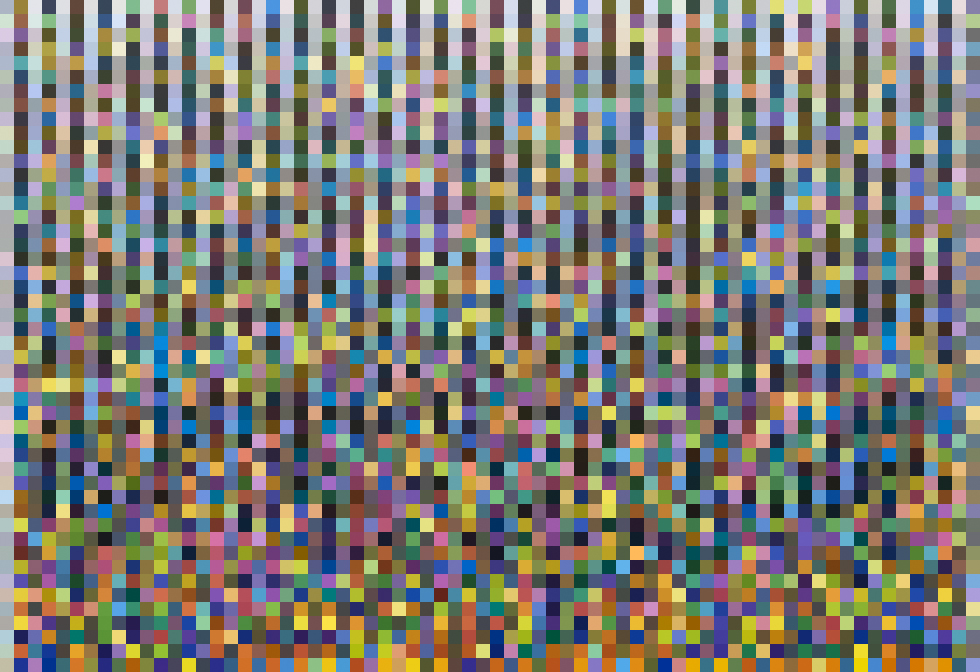
This image contains all current ChromaSpot samples. It can be used for evaluation purposes and come with CGATS Lab data.
→ Read more here.
|
Multi-Language Plain Names |
Sample names in English are the original version, but not the only one.
Color names have a cultural meaning; they should be developed by specialists familiar with the semantics of the language in this area. Using a dictionary mechanically is not a good practice. Obtaining a positive opinion of the environment of designers working professionally with color is the key to creating a universally accepted system. For example, in Poland, to create Polish language versions, cooperation was established with the Academy of Fine Arts in Krakow, and the Faculty of Industrial Design, where professors and students accepted the invitation to work on such a task.
In practical use, the user should choose the language of common names if he wants to use a different than the default English version. Currently, support for the following languages is the implementation:
- French
- German
- Italian
- Polish
- Spanish
Contact us if you are ready to lead the specific language naming committee, which can take care of names for ChromaSpot.
|
Subsets |
The whole library contains 3600+ samples. It covers some color space that can be hard to reproduce using typical printing technologies. Managing/Searching all samples might not be practical. If the user is working in a specific segment of the industry — a corresponding subset might be very practical. ChromaSpot system has a predefined subset that the user may use to work "safe" with the colors. For example, by selecting "CMYK Digital," the user will have a shorter list of color samples, but all samples should be printable by a Digital printer based on 4 primaries CMYK. If the Digital Press offers more Primaries - the extended "CMYKOVG Digital" Subset can be used. On the same principle total library might be narrowed to sRGB, Adobe RGB, or WideGamut Display space where RGB space limits samples.
Also, the user may upload any ICC Profile (CMYK, nCLR, or RGB) to use as a limiter.
Subsets:
- Named only (samples with plain English names)
- Spot Offset Coated
- CMYK Offset Coated
- Spot Offset Uncoated
- CMYK Offset Uncoated
- CMYK Digital
- read more about the current subset proposal
New subsets can be proposed and added in the future to reflect the current limitations of color-reproducing technologies better.
In practice, the user can upload Subset Library to InDesign or the internal memory of X-Rte eXact. Also, for the RIP, it is better to reduce the number of samples to the optimal set. Designers may want to work with a subset that can be obtained as wall paint, and so on... In most cases, we do not need access to all samples; that is why we need Subsets.
|
Features & Benefits |
- The substrate-independent color library

- A simple coding convention that is easy to render in the imagination
- Based on measurements of reproducible (printable, paintable, ...) samples
- Optimized for color space homogeneity
- Provides additional reproducibility information
- Designed by designers for designers
- Compliant with the most important industry standards
- Cares about the phenomena of fluorescence and metamerism
|
Technical Specification |
- The coding system can handle over 36,000 samples (without variants), but this is about ten times more than needed. For practical reasons, it was established that the library must be homogeneous, the samples must not be too close (>1.5 ∆E 2000) or too far (<4.0∆E), and the entire printable area should be covered with such density. ChromaSpot uses an algorithm that analyzes space distances for a couple of closest neighbors for each sample in the library.
- The whole system is based on physical spectral measurements captured in multi-M-condition mode (M0, M1, and M2). As a master Instrument, X-Rite i1Pro v3 has been selected as one of the most popular on the market. M1 data are free; others are not. For users unfamiliar with M-conditions ad the consequences of OBA's influence on color appearance, we strongly recommend using M1 only.
- Physical samples are printed on a substrate that contains a moderate amount of OBA's
- Native system Color Specification is based on the following:
- M1 measurement condition (D50 where UV component in the light is standardized)
- D50 Illuminant is selected (basic for the Print Industry and Color Management)
- Neutral grays (N.LL) are neutral in M1 only.
- The list of samples is open*, and new samples can be added in the future – the current capacity is about 3360 samples.
* The list is open; however, for most common subsets (read here), there is no room for new samples. Only some extremal regions of color space still don't have perfect coverage. Also, it is possible in the future that new colorants or pigments can be developed. Extremal examples can be: Vantablack, Black 2.0, Black 3.0, or Anish Kapoor Pinkest Pink - but it is possible that some less extreme solution becomes popular.
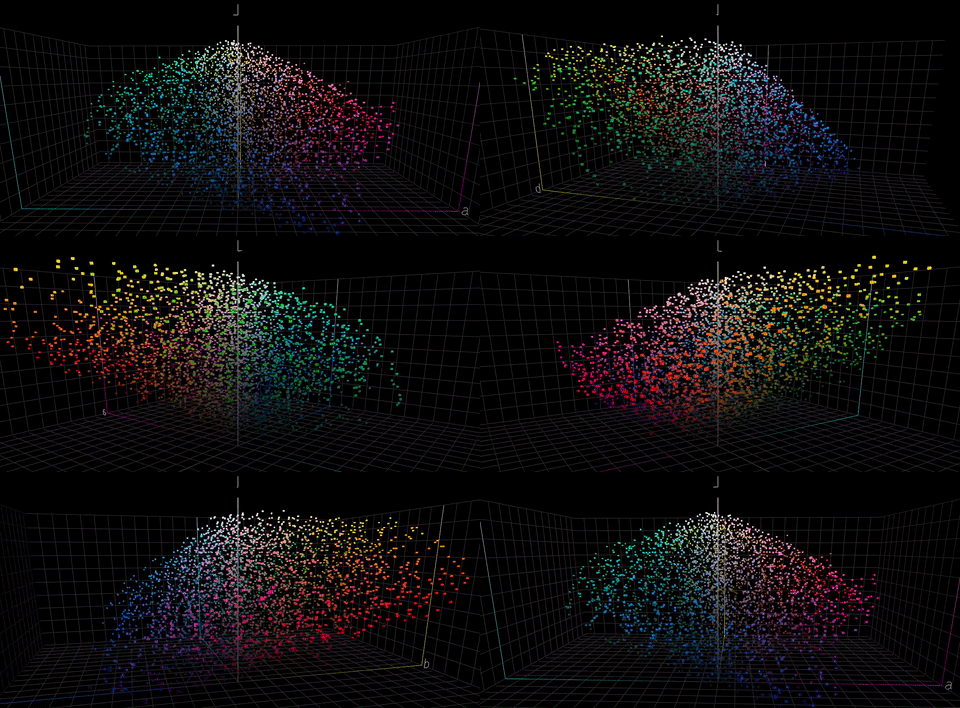
→ Learn more about ChromaSpot space homogeneity here.
|
Project |
- ChromaSpot is a universal color library designed to be an alternative to existing solutions.
- Basic access to the library is free of charge — today and in the future.
- ChromaSpot is compliant with key ISO and industry standards.
- ChromaSpot is an independent project that was developed as an international initiative by color specialists.
- Chromasync Company, Poland, manages the ChromaSpot Commission.
- The ChromaChecker Corporation joined the project and offered all users a basic free version within CC Capture.
- ChromaSpot is an open database - new color samples can be introduced in the future.
- ChromaSpot offers a human-understandable naming system and actual color names, which make color communication easier, more effective, and more accurate.
- Users can propose new colors after commission approval is registered, and extended names will be published.
- ChromaSpot API will be published (preliminary accessible to the initiative group only) - any software/hardware manufacturer (RIPs, Color Servers, and more) will be able to synchronize with the central repository.
- New candidates that want to join the initiative group have to commit to allowing users to access the library free of charge.
|
Implementations |
CC Capture QuickChecker
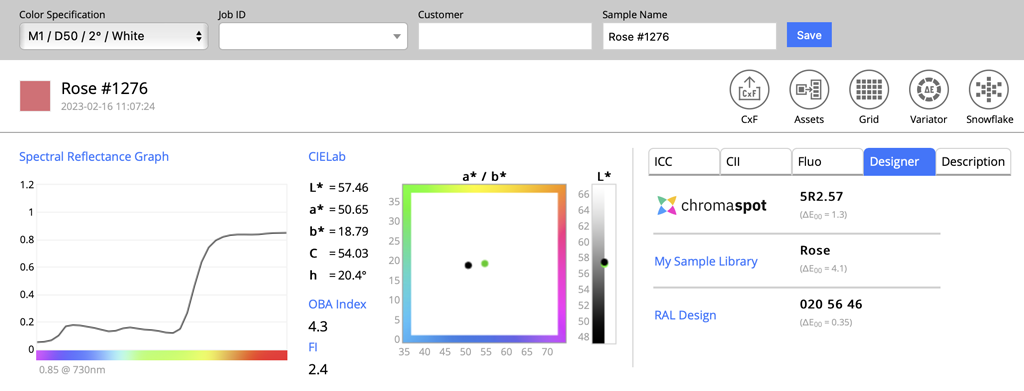
ChromaChecker Capture is the first software on the market with ChromaSpot implementation. QuickChecker tool in the Designer tab offers an automatic closest match search for any measured sample in any Color Specification. No additional installation or activation is required.
It is important that CC Capture can drive most of the Instruments in that market ( Most X-Rite, Techkon, Myiro-1), including pocket instruments (Nix, Varaiabble Spectro). Upcoming support for ColorChecker Studio - will make this solution accessible to designers, photographers, and architects.
→ Learn more here.
X-Rite eXact/eXact 2
Thanks to industry standards (CxF), state-of-the-art Instruments can use ChromaSpot Library in native mode. Read more here.
 |
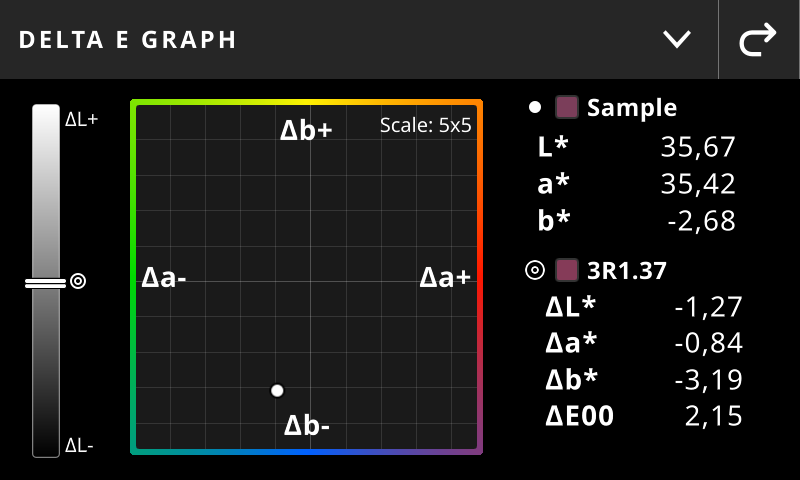 |
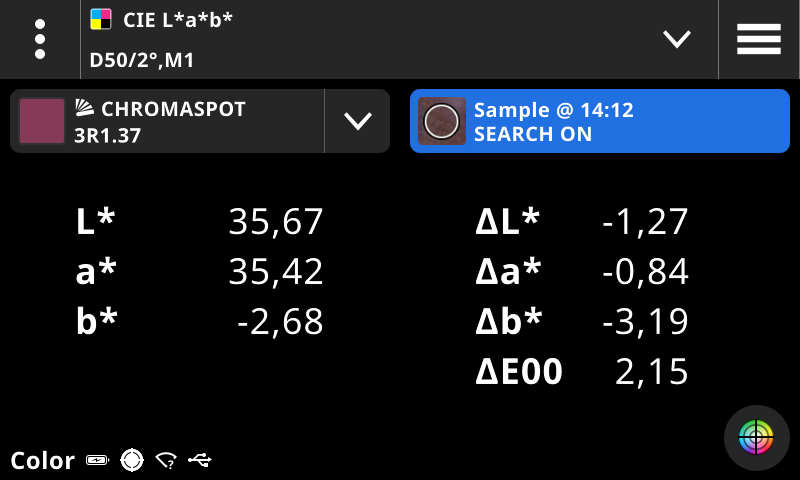
In this example, we can see that the sample differs from the reference mainly in the b* value - which means it is slightly more blueish. Delta E 2000 difference is 2.15 - what most people will recognize as visible but only when compared directly - for isolated samples and reference - it is much harder to perceive a difference. It is practically impossible that we - humans can remember the color with this kind of accuracy.
→ Learn more here.
Related Topics
Contact ChromaChecker Support
Additional information and Support Form is available for logged users.
